Blogging Tricks And Templates

A blog full of the blogging stuff...!! Templates, Gadgets, Widgets and more!!

EntreCard

Your Request

Widgetbox Network

Widgetbox Network (+/-)

Helpers

Blogging Tips Blogs - BlogCatalog Blog Directory Blog Ratings

License

Creative Commons License
Blogging Tricks And Secrets by Danial is licensed under a Creative Commons Attribution 2.5 India License.

How to show blogger widget only in home page or blogger posts pages.
Add the widget in blogger layout where you want to display in blogger.Now you wnt to select on which pages of blogger it should be displayed.

Now go to "Edit HTML" page.
Mark "Expand Widget Templates"

And Search for -
<b:widget id='HTML3' locked='false' title='Your Title name you gave to your widget' type='HTML'>

The number in red can be any like 1,2,3,4 it depends on your no of widget your are adding but the title to the widget you gave will be same.

So to make the widget code find easily for you find the below word

<b:widget id='HTML

and you will find many codes like these so keep on matchng the title name of widget of them to which you want to show on different pages.

After finding the code of widget you want to display on different pages add the red codes to them as i have shown below.

To display the any Blogger widget only in HomePage


<b:widget id='HTML5' locked='false' title='Widget Title Name' type='HTML'>
<b:includable id='main'>
<b:if cond='data:blog.url == data:blog.homepageUrl'>
<!-- only display title if it's non-empty -->
<b:if cond='data:title != &quot;&quot;'>
<h2 class='title'><data:title/></h2>
</b:if>
<div class='widget-content'>
<data:content/>
</div>

<b:include name='quickedit'/>
</b:if>
</b:includable>
</b:widget>
Add the red codes as shown above in codes whch you found for that particular widget in your blog html.

To display widget in all posts pages but not in HomePage


<b:widget id='HTML3' locked='false' title='Widget Title Name' type='HTML'>
<b:includable id='main'>
<b:if cond='data:blog.pageType == "item"'>
<!-- only display title if it's non-empty -->
<b:if cond='data:title != &quot;&quot;'>
<h2 class='title'><data:title/></h2>
</b:if>
<div class='widget-content'>
<data:content/>
</div>

<b:include name='quickedit'/>
</b:if>
</b:includable>
</b:widget>

To Display Widget In Archive Pages


<b:widget id='HTML3' locked='false' title='Widget Title Name' type='HTML'>
<b:includable id='main'>
<b:if cond='data:blog.pageType == "archive"'>
<!-- only display title if it's non-empty -->
<b:if cond='data:title != &quot;&quot;'>
<h2 class='title'><data:title/></h2>
</b:if>
<div class='widget-content'>
<data:content/>
</div>

<b:include name='quickedit'/>
</b:if>
</b:includable>
</b:widget>


Your Comment plzzz

Backup your blogger posts and comments regularly,this is blogger tip i think every blogger should follow for its safety,do you back up your blog posts regularly ? Very less amount of bloggers would have been using this tip including me,so lets follow this tip and start backing up your blog posts from now as i have stared it from today.

Login to http://draft.blogger.com
Then Go to
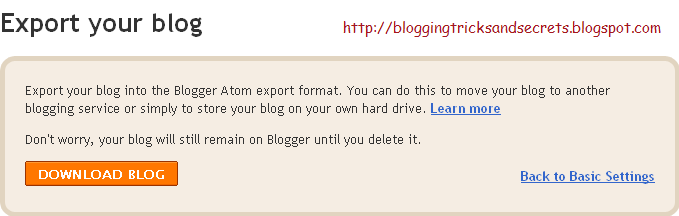
SETTINGS > BASIC > BLOG TOOLS, click on the Export Blog, and once more on EXPORT BLOG button.


Choose the location where you want to save the file, and click Save. And that's it!

Your Blog (content + posts) is save as .xml document. Quite small, too. You will not be able to see it, or read it on externally, but you can always upload it through Blogger.


Simple Stuff But Very Usefull

Hello Friends Lets Talk About LinkList... I am gonna tell you about How to Add LinkList As Horizontal Top Menu Links in blogger!!


GO TO Layout > Edit HTML
Then Search For Code </b:skin>
 
Now add these below Css codes before it-

/* ----- LINKBAR ----- */
#linkbar {
margin: 6px 0px 0px 0px;
padding: 0px 0px 0px 0px;
width: 100%;
position: relative;
background: #000;
border: 1px solid #000;
border-bottom: 0;
}

#linkbar ul {
margin: 0px 0px 0px 0px;
padding: 5px 5px 7px 5px;
text-align: left;
list-style-type:none;
}

#linkbar li {
display: inline;
margin: 0px 0px 0px 0px;
padding: 0px 0px 0px 0px;
}

#linkbar h2 {
margin: 0px 0px 0px 0px;
padding: 0px 0px 0px 0px;
display: none;
visibility: hidden;
}

#linkbar a {
clear: both;
margin: 0px -4px 0px 0px;
padding: 3px 20px 3px 20px;
width:100%;
text-decoration:none;
font-family: arial, sans-serif;
font-weight: bold;
font-size: 12px;
color: #fff;
border-right: 1px solid #fff;
}

#linkbar a:hover {
color: #000;
background: #fff;
}


Now Search for below codes-

<div id='header-wrapper'>
<b:section class='header' id='header' maxwidgets='1' showaddelement='no'>
<b:widget id='Header1' locked='true' title='Testing templates (Header)' type='Header'/>
</b:section>
</div>


And add the below codes after the above codes:-

<div id='linkbar-wrapper'>
<b:section class='linkbar' id='linkbar' showaddelement='no'>
<b:widget id='LinkList1' locked='true' title='Linkbar' type='LinkList'>
<b:includable id='main'>

<b:if cond='data:title'><h2><data:title/></h2></b:if>
<div class='widget-content'>
<ul>
<b:loop values='data:links' var='link'>
<li><a expr:href='data:link.target'><data:link.name/></a></li>
</b:loop>
</ul>

</div>
</b:includable>
</b:widget>
</b:section>
</div>


Now Goto Page elements and you will see an gadget named linkbar in your blogger layout below the header of you blog,click the Edit Button On that gadget an window will open and add the link you want to show up in your blog top menu from there and can manage all menu links from there...
Its Easy Dude!!! If having problem COMMENT here

Your Ad Here